企业AI智能体
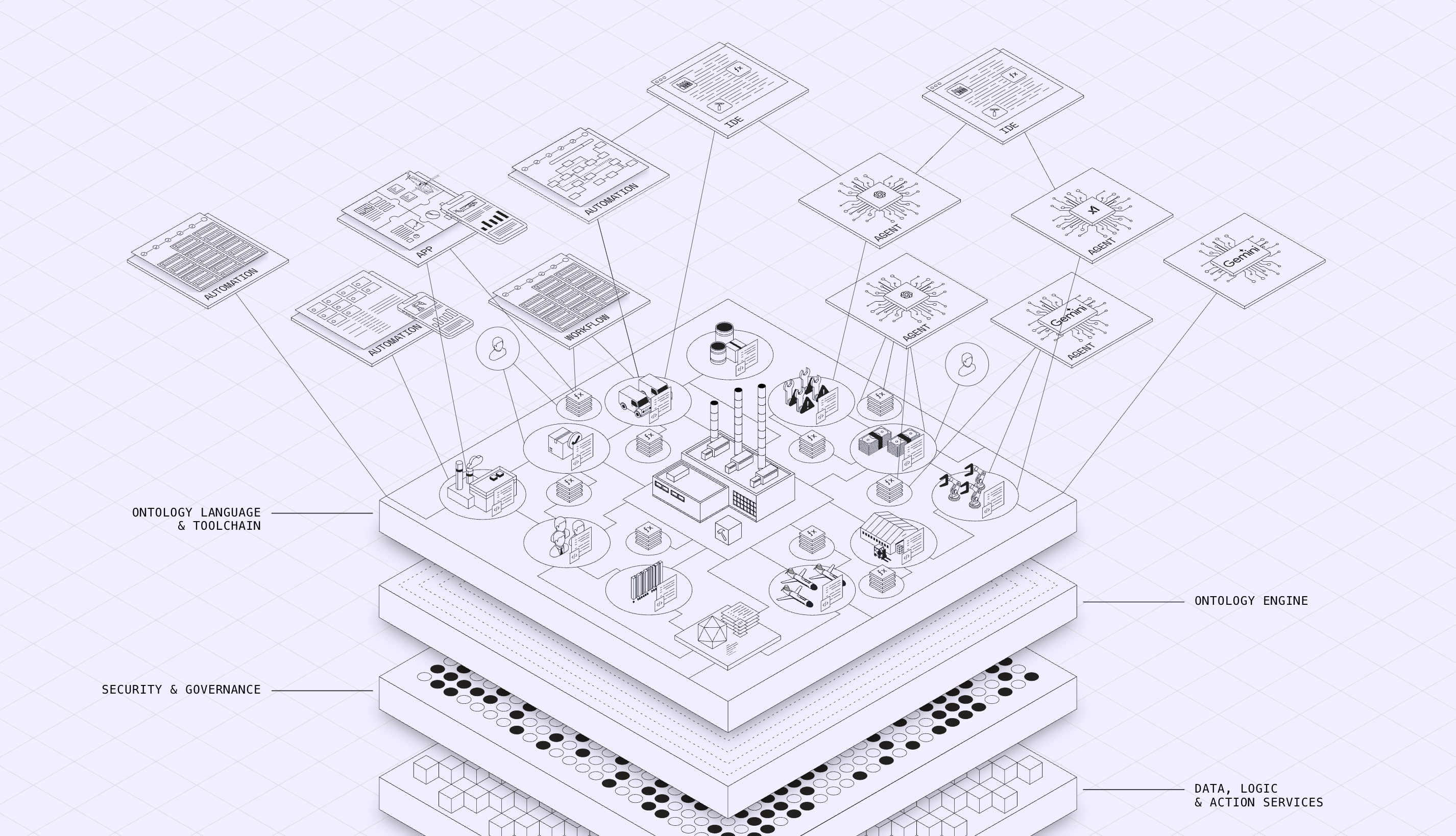
知识层:AI 的记忆系统。将企业所有结构化数据和非结构化文档(合同、纪要、方案等)统一纳管和理解,让AI真正懂得您的业务。
技能层:AI 的执行系统。将企业中高频、重复的业务动作(如写报告、做数据分析)封装成可复用的AI技能,实现自动化、标准化的精准执行。
呈现层:AI 的表达系统。直接输出文本、数据、图表等可直接使用的成品,真正做到"输出即成品",极大提升工作效率。
Enterprise AIP 帮助企业完成从简单数据存档到智能化决策的跨越,为您的企业配备一个会思考、能执行的"第二大脑"。
我可以帮你解答问题、管理计算机、创造和执行技能,并通过
长期记忆和知识库不断成长
查看工作空间里有哪些文件
1分钟后提醒我检查服务器
搜索AI资讯并生成可视化网页报告
把知识库里的园区企业数更正为 383 家
合并知识库里的重复页面,去重并更新交叉引用
查看所有支持的工具和技能
查看全部命令
配置管理
管理模型和 Agent 配置
记忆管理
查看 Agent 记忆文件和内容
加载记忆文件中...
记忆文件将显示在此处
| 文件名 | 类型 | 大小 | 更新时间 |
|---|
知识库
浏览和探索你的知识库
加载知识库中...
知识页面将显示在这里
在对话中发送文档、链接或主题给 Agent,它会自动整理到你的知识库中。
选择一个文档查看
快问快答
命中 FAQ 直接返回标准答案,未命中基于知识库生成FAQ 管理
模型管理
统一管理对话、视觉、语音、向量、图像、搜索能力
通道管理
管理已接入的消息通道
定时任务
查看和管理定时任务
Loading...
日志
实时日志输出 (run.log)
日志流即将在此提供。将连接 run.log 实现类似 tail -f 的实时输出。
Enterprise AIP Ontology
连接数据源,使用自然语言跨域查询
暂无数据源
点击上方按钮创建
开始您的数据探索之旅,创建数据源后即可查询
让数据查询如对话般简单
面向业务/数据人员,通过自然语言交互查询多源数据,自动解析数据结构,可视化输出报表与智能分析,全面降低企业数据查询门槛。
Schema
数据源信息
选择数据源查看 Schema
驾驶舱
Pack-driven 数据驾驶舱
点击刷新加载驾驶舱
API开发指南
使用HTTP API和SSE流式响应集成 Enterprise AIP Ontology 能力
AIP TALK 第三方 SSO / 嵌入集成
将 AIP TALK 嵌入到第三方门户或 ERP
第三方系统可以通过 SSO 断言获取 CowAgent 令牌,并在 iframe 中嵌入 AIP TALK 对话界面。 完整配置、代码示例和排错指南见: /api/aip-talk/integration-guide
- 1. 启用 multi_user_mode 并配置 sso_trusted_issuers。
- 2. 用 HMAC-SHA256 JWT 断言调用 POST /api/v1/sso/token 换 token。
- 3. 在 iframe src 中带上 token,并确保域名已加入 allowed_origins。
<iframe id="aip-talk-frame" src="http://localhost:9899/embed/aip-talk?token=TOKEN"
width="100%" height="600" frameborder="0"></iframe>服务器配置 & API 测试
这是其他开发者调用 API 时使用的基础地址
如果服务在云服务器或有公网域名,请在此配置。配置后重启服务生效。
认证方式
所有API请求需要认证。Web控制台使用Cookie认证(cow_auth_token),外部调用可先通过 /auth/login 获取token。
curl -X POST http://localhost:9899/auth/login \
  -H "Content-Type: application/json" \
  -d '{"password":"your_password"}'
登录后,Cookie会自动设置,后续请求携带即可。
API端点概览
| 方法 | 路径 | 说明 |
|---|---|---|
| POST | /api/v1/data-sources | 创建数据源 |
| GET | /api/v1/data-sources | 列出数据源 |
| GET | /api/v1/data-sources/{source_id} | 获取数据源详情 |
| DELETE | /api/v1/data-sources/{source_id} | 删除数据源 |
| POST | /api/v1/query | 执行SQL查询 |
| POST | /api/v1/nl-query | 自然语言查询(JSON响应) |
| POST | /api/v1/nl-query-stream | 自然语言查询(SSE流式)🌊 |
| POST | /api/v1/schema/{source_id}/visualize | 获取Schema可视化数据 |
| POST | /api/v1/insights/decisions/{decision_id}/share | 共享决策 |
| POST | /api/v1/insights/decisions/{decision_id}/approve | 审批决策 |
| POST | /api/v1/insights/decisions/diff-summary | 生成预期 vs 实际差异摘要 |
创建数据源
POST /api/v1/data-sources
curl -X POST http://localhost:9899/api/v1/data-sources \
  -H "Content-Type: application/json" \
  -H "Cookie: cow_auth_token=xxx" \
  -d '{
    "source_type": "csv",
    "name": "销售数据",
    "connection_params": {
      "file_path": "/path/to/sales.csv"
    },
    "is_persistent": true
}'import requests
response = requests.post(
"http://localhost:9899/api/v1/data-sources",
cookies={"cow_auth_token": "xxx"},
json={
"source_type": "csv",
"name": "销售数据",
"connection_params": {"file_path": "/path/to/sales.csv"},
"is_persistent": True
}
)
print(response.json())const response = await fetch("http://localhost:9899/api/v1/data-sources", {
method: "POST",
headers: { "Content-Type": "application/json" },
credentials: "include",
body: JSON.stringify({
source_type: "csv",
name: "销售数据",
connection_params: { file_path: "/path/to/sales.csv" },
is_persistent: true
})
});
const data = await response.json();
console.log(data);执行查询
POST /api/dataquery/query
支持SQL和自然语言。如果查询不是以SELECT开头,将自动使用自然语言模式。
curl -X POST http://localhost:9899/api/dataquery/query \
  -H "Content-Type: application/json" \
  -H "Cookie: cow_auth_token=xxx" \
  -d '{
    "source_id": "csv_xxx",
    "query": "查询销售额最高的10个产品",
    "use_nl": true
  }'
SSE流式查询
POST /api/v1/nl-query-stream
SSE流式查询实时返回处理进度和结果数据。支持自然语言查询,逐步返回:开始状态、生成的SQL、执行进度、每一行数据。
SSE 事件类型:
start - 开始处理translating - 正在翻译sql - 生成的 SQLexecuting - 正在执行chunk - 数据块(逐行)complete - 完成error - 错误信息const response = await fetch('/api/v1/nl-query-stream', {
method: 'POST',
headers: {'Content-Type': 'application/json'},
body: JSON.stringify({
source_id: 'your-datasource-id',
nl_query: '查询销售额最高的10个产品'
})
});
const reader = response.body.getReader();
const decoder = new TextDecoder();
while (true) {
const {done, value} = await reader.read();
if (done) break;
const chunk = decoder.decode(value);
const lines = chunk.split('\\n');
for (const line of lines) {
if (line.startsWith('event:')) {
const eventType = line.substring(7).trim();
console.log('Event:', eventType);
} else if (line.startsWith('data:')) {
const data = JSON.parse(line.substring(5));
switch (eventType) {
case 'sql':
console.log('生成的 SQL:', data.sql);
break;
case 'chunk':
// 逐行显示结果
appendRow(data.row);
break;
case 'complete':
console.log('查询完成,共', data.total_rows, '行');
break;
case 'error':
console.error('错误:', data.message);
break;
}
}
}
}决策复盘
POST /api/v1/insights/decisions/...
支持共享决策、审批决策,以及基于 LLM 生成“预期 vs 实际”差异摘要。
curl -X POST http://localhost:9899/api/v1/insights/decisions/42/share \
  -H "Content-Type: application/json" \
  -H "Cookie: cow_auth_token=xxx" \
  -d '{
    "user_ids": ["user_001", "user_002"],
    "visibility": "shared"
}'curl -X POST http://localhost:9899/api/v1/insights/decisions/42/approve \
-H "Content-Type: application/json" \
-H "Cookie: cow_auth_token=xxx" \
-d '{
"approval_status": "approved",
"approved_by": "manager_001"
}'curl -X POST http://localhost:9899/api/v1/insights/decisions/diff-summary \
-H "Content-Type: application/json" \
-H "Cookie: cow_auth_token=xxx" \
-d '{
"decision_id": 42
}'import requests
API_BASE = "http://localhost:9899"
cookies = {"cow_auth_token": "xxx"}
# 共享决策
r1 = requests.post(
f"{API_BASE}/api/v1/insights/decisions/42/share",
cookies=cookies,
json={"user_ids": ["user_001"], "visibility": "shared"},
)
print(r1.json())
# 审批决策
r2 = requests.post(
f"{API_BASE}/api/v1/insights/decisions/42/approve",
cookies=cookies,
json={"approval_status": "approved", "approved_by": "manager_001"},
)
print(r2.json())
# 生成预期 vs 实际差异摘要
r3 = requests.post(
f"{API_BASE}/api/v1/insights/decisions/diff-summary",
cookies=cookies,
json={"decision_id": 42},
)
print(r3.json())开发指南
完整的客户端集成示例,快速上手 Enterprise AIP Ontology API
🚀 快速开始
三步即可集成 Enterprise AIP Ontology 能力:
/api/dataquery/openapi.json
📡 核心 API 端点
自然语言查询(推荐,流式输出)
列出所有数据源
执行 SQL 查询
获取数据源结构
🔧 cURL 快速测试
# 1. 列出数据源
curl http://192.168.0.142:9899/api/v1/data-sources

# 2. 自然语言查询(流式)
curl -N -X POST http://192.168.0.142:9899/api/v1/nl-query-stream \
  -H "Content-Type: application/json" \
  -d '{"source_id":"xxx","nl_query":"查询销售额最高的产品"}'

# 3. 执行 SQL 查询
curl -X POST http://192.168.0.142:9899/api/v1/query \
  -H "Content-Type: application/json" \
  -d '{"source_id":"xxx","query":"SELECT * FROM products LIMIT 10"}'
HTML + JavaScript 完整示例
<!DOCTYPE html>
<html>
<head>
    <meta charset="UTF-8">
    <title>Enterprise AIP Ontology Demo</title>
    <style>
        body { font-family: Arial, sans-serif; max-width: 800px; margin: 50px auto; padding: 20px; }
        #query-input { width: 70%; padding: 10px; border: 1px solid #ddd; border-radius: 4px; }
        button { padding: 10px 20px; background: #007bff; color: white; border: none; border-radius: 4px; cursor: pointer; }
        button:hover { background: #0056b3; }
        button:disabled { background: #ccc; cursor: not-allowed; }
        #result { margin-top: 20px; }
        table { border-collapse: collapse; width: 100%; margin-top: 10px; }
        th, td { border: 1px solid #ddd; padding: 8px; text-align: left; }
        th { background: #f5f5f5; }
        .loading { color: #888; }
        .sql { background: #f0f0f0; padding: 10px; margin: 10px 0; font-family: monospace; border-radius: 4px; }
        .error { color: red; padding: 10px; background: #fee; border-radius: 4px; }
    </style>
</head>
<body>
    <h1>📊 Enterprise AIP Ontology Demo</h1>
    <div>
        <input type="text" id="query-input" placeholder="输入问题,如:查询销售额最高的产品" />
        <button id="query-btn" onclick="query()">查询</button>
    </div>
    <div id="result"></div>

    <script>
        const API_BASE = 'http://192.168.0.142:9899';
        const SOURCE_ID = 'your-datasource-id';

        async function query() {
            const input = document.getElementById('query-input');
            const result = document.getElementById('result');
            const btn = document.getElementById('query-btn');
            const query = input.value.trim();

            if (!query) return;

            btn.disabled = true;
            result.innerHTML = '<p class="loading">⏳ 正在处理...</p>';

            try {
                const response = await fetch(`${API_BASE}/api/v1/nl-query-stream`, {
                    method: 'POST',
                    headers: {'Content-Type': 'application/json'},
                    body: JSON.stringify({
                        source_id: SOURCE_ID,
                        nl_query: query
                    })
                });

                const reader = response.body.getReader();
                const decoder = new TextDecoder();

                result.innerHTML = '';
                let eventType = '';

                while (true) {
                    const {done, value} = await reader.read();
                    if (done) break;

                    const chunk = decoder.decode(value);
                    const lines = chunk.split('\\n');

                    for (const line of lines) {
                        if (line.startsWith('event:')) {
                            eventType = line.substring(7).trim();
                        } else if (line.startsWith('data:')) {
                            const data = JSON.parse(line.substring(5));

                            if (eventType === 'sql') {
                                result.innerHTML += `<div class="sql">📝 生成的 SQL: ${data.sql}</div>`;
                                result.innerHTML += '<table id="result-table"><thead><tr id="header-row"></tr></thead><tbody></tbody></table>';
                            } else if (eventType === 'columns') {
                                const headerRow = document.getElementById('header-row');
                                if (headerRow) {
                                    data.columns.forEach(col => {
                                        headerRow.innerHTML += `<th>${col}</th>`;
                                    });
                                }
                            } else if (eventType === 'chunk') {
                                const tbody = document.querySelector('#result-table tbody');
                                if (tbody) {
                                    const tr = document.createElement('tr');
                                    Object.values(data.row).forEach(val => {
                                        tr.innerHTML += `<td>${val}</td>`;
                                    });
                                    tbody.appendChild(tr);
                                }
                            } else if (eventType === 'complete') {
                                const table = document.getElementById('result-table');
                                if (table) {
                                    const caption = document.createElement('caption');
                                    caption.textContent = `✅ 共 ${data.total_rows} 条记录`;
                                    table.insertBefore(caption, table.firstChild);
                                }
                                btn.disabled = false;
                            } else if (eventType === 'error') {
                                result.innerHTML += `<div class="error">❌ ${data.message}</div>`;
                                btn.disabled = false;
                            }
                        }
                    }
                }
            } catch (error) {
                result.innerHTML = `<div class="error">❌ ${error.message}</div>`;
                btn.disabled = false;
            }
        }

        document.getElementById('query-input').addEventListener('keypress', function(e) {
            if (e.key === 'Enter') query();
        });
    </script>
</body>
</html>
React + TypeScript 示例
import React, { useState } from 'react';

interface RowData {
  [key: string]: string | number;
}

interface QueryResponse {
  total_rows: number;
  row: RowData;
}

export default function AiQueryDemo() {
  const [query, setQuery] = useState('');
  const [sql, setSql] = useState('');
  const [rows, setRows] = useState([]);
  const [loading, setLoading] = useState(false);
  const [error, setError] = useState('');
  const [columns, setColumns] = useState([]);

  const handleQuery = async () => {
    if (!query.trim()) return;

    setLoading(true);
    setError('');
    setRows([]);
    setSql('');
    setColumns([]);

    try {
      const response = await fetch('http://192.168.0.142:9899/api/v1/nl-query-stream', {
        method: 'POST',
        headers: { 'Content-Type': 'application/json' },
        body: JSON.stringify({
          source_id: 'your-datasource-id',
          nl_query: query
        })
      });

      const reader = response.body?.getReader();
      const decoder = new TextDecoder();
      let eventType = '';

      if (!reader) throw new Error('No response body');

      while (true) {
        const { done, value } = await reader.read();
        if (done) break;

        const chunk = decoder.decode(value);
        const lines = chunk.split('\n');

        for (const line of lines) {
          if (line.startsWith('event:')) {
            eventType = line.substring(7).trim();
          } else if (line.startsWith('data:')) {
            const data = JSON.parse(line.substring(5));

            switch (eventType) {
              case 'sql':
                setSql(data.sql);
                break;
              case 'columns':
                setColumns(data.columns);
                break;
              case 'chunk':
                setRows(prev => [...prev, data.row]);
                break;
              case 'complete':
                setLoading(false);
                break;
              case 'error':
                setError(data.message);
                setLoading(false);
                break;
            }
          }
        }
      }
    } catch (err) {
      setError(err instanceof Error ? err.message : 'Unknown error');
      setLoading(false);
    }
  };

  return (
    <div className="max-w-4xl mx-auto p-6">
      <h1 className="text-2xl font-bold mb-6">📊 Enterprise AIP Ontology</h1>

      <div className="flex gap-2 mb-6">
        <input
          type="text"
          value={query}
          onChange={(e) => setQuery(e.target.value)}
          onKeyPress={(e) => e.key === 'Enter' && handleQuery()}
          placeholder="输入问题,如:查询销售额最高的产品"
          className="flex-1 px-4 py-2 border rounded-lg focus:outline-none focus:ring-2 focus:ring-blue-500"
          disabled={loading}
        />
        <button
          onClick={handleQuery}
          disabled={loading || !query.trim()}
          className="px-6 py-2 bg-blue-500 text-white rounded-lg hover:bg-blue-600 disabled:bg-gray-300"
        >
          {loading ? '查询中...' : '查询'}
        </button>
      </div>

      {error && (
        <div className="mb-4 p-4 bg-red-50 border border-red-200 rounded-lg text-red-600">
          ❌ {error}
        </div>
      )}

      {sql && (
        <div className="mb-4 p-4 bg-gray-100 rounded-lg">
          <h3 className="text-sm font-semibold mb-2">📝 生成的 SQL</h3>
          <code className="text-sm text-gray-700">{sql}</code>
        </div>
      )}

      {rows.length > 0 && (
        <div className="overflow-x-auto">
          <table className="w-full border-collapse border border-gray-300">
            <thead>
              <tr className="bg-gray-100">
                {columns.map(col => (
                  <th key={col} className="border border-gray-300 px-4 py-2 text-left">
                    {col}
                  </th>
                ))}
              </tr>
            </thead>
            <tbody>
              {rows.map((row, idx) => (
                <tr key={idx}>
                  {columns.map(col => (
                    <td key={col} className="border border-gray-300 px-4 py-2">
                      {row[col]}
                    </td>
                  ))}
                </tr>
              ))}
            </tbody>
          </table>
          <p className="mt-2 text-sm text-gray-500">✅ 共 {rows.length} 条记录</p>
        </div>
      )}
    </div>
  );
}
Vue 3 + TypeScript 示例
<script setup lang="ts">
import { ref } from 'vue';

interface RowData {
  [key: string]: string | number;
}

const query = ref('');
const sql = ref('');
const rows = ref<RowData[]>([]);
const loading = ref(false);
const error = ref('');
const columns = ref<string[]>([]);

const handleQuery = async () => {
  if (!query.value.trim()) return;

  loading.value = true;
  error.value = '';
  rows.value = [];
  sql.value = '';
  columns.value = [];

  try {
    const response = await fetch('http://192.168.0.142:9899/api/v1/nl-query-stream', {
      method: 'POST',
      headers: { 'Content-Type': 'application/json' },
      body: JSON.stringify({
        source_id: 'your-datasource-id',
        nl_query: query.value
      })
    });

    const reader = response.body?.getReader();
    const decoder = new TextDecoder();
    let eventType = '';

    if (!reader) throw new Error('No response body');

    while (true) {
      const { done, value } = await reader.read();
      if (done) break;

      const chunk = decoder.decode(value);
      const lines = chunk.split('\n');

      for (const line of lines) {
        if (line.startsWith('event:')) {
          eventType = line.substring(7).trim();
        } else if (line.startsWith('data:')) {
          const data = JSON.parse(line.substring(5));

          switch (eventType) {
            case 'sql':
              sql.value = data.sql;
              break;
            case 'columns':
              columns.value = data.columns;
              break;
            case 'chunk':
              rows.value.push(data.row);
              break;
            case 'complete':
              loading.value = false;
              break;
            case 'error':
              error.value = data.message;
              loading.value = false;
              break;
          }
        }
      }
    }
  } catch (err) {
    error.value = err instanceof Error ? err.message : 'Unknown error';
    loading.value = false;
  }
};
</script>

<template>
  <div class="max-w-4xl mx-auto p-6">
    <h1 class="text-2xl font-bold mb-6">📊 Enterprise AIP Ontology</h1>

    <div class="flex gap-2 mb-6">
      <input
        v-model="query"
        @keypress.enter="handleQuery"
        placeholder="输入问题,如:查询销售额最高的产品"
        :disabled="loading"
        class="flex-1 px-4 py-2 border rounded-lg focus:outline-none focus:ring-2 focus:ring-blue-500"
      />
      <button
        @click="handleQuery"
        :disabled="loading || !query.trim()"
        class="px-6 py-2 bg-blue-500 text-white rounded-lg hover:bg-blue-600 disabled:bg-gray-300"
      >
        {{ loading ? '查询中...' : '查询' }}
      </button>
    </div>

    <div v-if="error" class="mb-4 p-4 bg-red-50 border border-red-200 rounded-lg text-red-600">
      ❌ {{ error }}
    </div>

    <div v-if="sql" class="mb-4 p-4 bg-gray-100 rounded-lg">
      <h3 class="text-sm font-semibold mb-2">📝 生成的 SQL</h3>
      <code class="text-sm text-gray-700">{{ sql }}</code>
    </div>

    <div v-if="rows.length" class="overflow-x-auto">
      <table class="w-full border-collapse border border-gray-300">
        <thead>
          <tr class="bg-gray-100">
            <th v-for="col in columns" :key="col" class="border border-gray-300 px-4 py-2 text-left">
              {{ col }}
            </th>
          </tr>
        </thead>
        <tbody>
          <tr v-for="(row, idx) in rows" :key="idx">
            <td v-for="col in columns" :key="col" class="border border-gray-300 px-4 py-2">
              {{ row[col] }}
            </td>
          </tr>
        </tbody>
      </table>
      <p class="mt-2 text-sm text-gray-500">✅ 共 {{ rows.length }} 条记录</p>
    </div>
  </div>
</template>
Python 示例
import requests
import json

API_BASE = "http://192.168.0.142:9899"
SOURCE_ID = "your-datasource-id"

def query_with_stream(nl_query: str):
    """使用 SSE 流式查询"""
    url = f"{API_BASE}/api/v1/nl-query-stream"
    payload = {
        "source_id": SOURCE_ID,
        "nl_query": nl_query
    }

    with requests.post(url, json=payload, stream=True) as response:
        response.raise_for_status()

        current_event = None
        for line in response.iter_lines():
            if not line:
                continue

            line = line.decode('utf-8')

            if line.startswith('event:'):
                current_event = line[7:].strip()
            elif line.startswith('data:'):
                data = json.loads(line[5:])

                if current_event == 'start':
                    print("🚀 开始处理查询...")
                elif current_event == 'translating':
                    print("🔤 正在翻译为 SQL...")
                elif current_event == 'sql':
                    print(f"📝 生成的 SQL: {data['sql']}")
                elif current_event == 'executing':
                    print("⚙️ 正在执行查询...")
                elif current_event == 'chunk':
                    print(f"📄 数据行: {data['row']}")
                elif current_event == 'complete':
                    print(f"✅ 查询完成! 共 {data['total_rows']} 条记录")
                elif current_event == 'error':
                    print(f"❌ 错误: {data['message']}")

# 使用示例
if __name__ == "__main__":
    # 列出所有数据源
    sources_response = requests.get(f"{API_BASE}/api/v1/data-sources")
    sources = sources_response.json()
    print("可用的数据源:")
    for source in sources.get('data_sources', []):
        print(f"  - {source['name']} (ID: {source['id']})")

    # 执行自然语言查询
    print("\n执行查询: 查询销售额最高的产品")
    query_with_stream("查询销售额最高的产品")

    # 执行 SQL 查询
    print("\n执行 SQL 查询:")
    sql_payload = {
        "source_id": SOURCE_ID,
        "query": "SELECT * FROM products LIMIT 5"
    }
    sql_response = requests.post(f"{API_BASE}/api/v1/query", json=sql_payload)
    print(json.dumps(sql_response.json(), indent=2, ensure_ascii=False))

    # 获取数据源结构
    print("\n获取数据源结构:")
    schema_response = requests.get(f"{API_BASE}/api/v1/schema/{SOURCE_ID}")
    schema = schema_response.json()
    print(f"表数量: {len(schema.get('tables', []))}")
    for table in schema.get('tables', [])[:5]:
        print(f"  - {table['name']}: {len(table['columns'])} 列")
Node.js 示例
const fetch = require('node-fetch');

const API_BASE = 'http://192.168.0.142:9899';
const SOURCE_ID = 'your-datasource-id';

async function queryWithStream(nlQuery) {
    /** 使用 SSE 流式查询 */
    const response = await fetch(`${API_BASE}/api/v1/nl-query-stream`, {
        method: 'POST',
        headers: {'Content-Type': 'application/json'},
        body: JSON.stringify({
            source_id: SOURCE_ID,
            nl_query: nlQuery
        })
    });

    if (!response.ok) {
        throw new Error(`HTTP error! status: ${response.status}`);
    }

    // 逐行读取 SSE 流
    const reader = response.body.getReader();
    const decoder = new TextDecoder();
    let currentEvent = null;
    let buffer = '';

    while (true) {
        const {done, value} = await reader.read();
        if (done) break;

        buffer += decoder.decode(value, {stream: true});
        const lines = buffer.split('\n');
        buffer = lines.pop() || ''; // 保留未完成的行

        for (const line of lines) {
            if (line.startsWith('event:')) {
                currentEvent = line.substring(7).trim();
            } else if (line.startsWith('data:')) {
                const data = JSON.parse(line.substring(5));

                switch (currentEvent) {
                    case 'start':
                        console.log('🚀 开始处理查询...');
                        break;
                    case 'translating':
                        console.log('🔤 正在翻译为 SQL...');
                        break;
                    case 'sql':
                        console.log(`📝 生成的 SQL: ${data.sql}`);
                        break;
                    case 'executing':
                        console.log('⚙️ 正在执行查询...');
                        break;
                    case 'columns':
                        console.log(`📋 列信息: ${data.columns.join(', ')}`);
                        break;
                    case 'chunk':
                        console.log(`📄 数据行:`, data.row);
                        break;
                    case 'complete':
                        console.log(`✅ 查询完成! 共 ${data.total_rows} 条记录`);
                        break;
                    case 'error':
                        console.error(`❌ 错误: ${data.message}`);
                        break;
                }
            }
        }
    }
}

// 使用示例
(async () => {
    try {
        // 1. 列出所有数据源
        const sourcesRes = await fetch(`${API_BASE}/api/v1/data-sources`);
        const sources = await sourcesRes.json();
        console.log('可用的数据源:');
        sources.data_sources?.forEach(source => {
            console.log(`  - ${source.name} (ID: ${source.id})`);
        });

        // 2. 执行自然语言查询
        console.log('\n执行查询: 查询延误最多的航班');
        await queryWithStream('查询延误最多的航班');

        // 3. 执行 SQL 查询
        console.log('\n执行 SQL 查询:');
        const sqlRes = await fetch(`${API_BASE}/api/v1/query`, {
            method: 'POST',
            headers: {'Content-Type': 'application/json'},
            body: JSON.stringify({
                source_id: SOURCE_ID,
                query: 'SELECT * FROM flights LIMIT 5'
            })
        });
        const sqlResult = await sqlRes.json();
        console.log(JSON.stringify(sqlResult, null, 2));

        // 4. 获取数据源结构
        console.log('\n获取数据源结构:');
        const schemaRes = await fetch(`${API_BASE}/api/v1/schema/${SOURCE_ID}`);
        const schema = await schemaRes.json();
        console.log(`表数量: ${schema.tables?.length || 0}`);

    } catch (error) {
        console.error('错误:', error.message);
    }
})();
跨域访问 (CORS) 配置说明
了解如何在跨域场景下调用 CowAgent DataQuery API
🔍 什么是 CORS?
CORS (Cross-Origin Resource Sharing) 是浏览器的安全机制。当您的应用从 http://app-a.com 访问 http://api-b.com 的API时,浏览器会发起预检请求(OPTIONS)来检查服务器是否允许跨域访问。
✅ CowAgent API 的 CORS 配置
本API已完全支持跨域访问,所有端点返回以下CORS头:
Access-Control-Allow-Origin: *Access-Control-Allow-Methods: GET, POST, PUT, DELETE, OPTIONSAccess-Control-Allow-Headers: Content-Type, Authorization
🌊 SSE 流式查询的 CORS 特殊处理
SSE (Server-Sent Events) 使用 text/event-stream 内容类型,需要特殊的CORS配置:
// ✅ 正确:使用 fetch + stream 处理 SSE
const response = await fetch('http://your-api:9899/api/v1/nl-query-stream', {
  method: 'POST',
  headers: {'Content-Type': 'application/json'},
  body: JSON.stringify({source_id: 'xxx', nl_query: '查询'})
});

const reader = response.body.getReader();
// ... 逐行读取
❓ 常见问题
Connection: keep-alive 和 Cache-Control: no-cache。
HTTP API 数据源配置指南
将远程数据库(如川航SQLite)通过HTTP API接入 CowAgent
使用场景
当您的数据库部署在远程服务器,无法直接建立TCP连接时,可以通过HTTP API端点访问。例如:远程SQLite数据库、已有HTTP接口的数据服务等。
📝 配置步骤
确定HTTP API端点URL,例如:
http://43.139.27.12/6d6b4e50087c/api/query
确认请求方法(GET/POST)和SQL参数名称:
GET /api/query?sql=SELECT%20*%20FROM%20flights
如果需要认证,配置认证方式(Bearer Token / API Key / Basic Auth)
🔧 创建数据源示例
# 川航SQLite数据源示例
curl -X POST http://your-server:9899/api/v1/data-sources \
  -H "Content-Type: application/json" \
  -d '{
    "type": "api",
    "name": "川航航班数据",
    "endpoint": "http://43.139.27.12/6d6b4e50087c/api/query",
    "method": "GET",
    "sql_param": "sql",
    "auth_type": "none",
    "timeout": 30,
    "verify_ssl": true
  }'
🔐 认证方式配置
"auth_type": "bearer"
"auth_token": "your_token"
"auth_type": "api_key"
"api_key": "your_key"
"auth_type": "basic"
"username": "user"
"password": "pass"
"auth_type": "none"
🧪 测试数据源连接
创建数据源后,可以通过以下方式验证连接:
# 1. 获取数据源列表
curl http://your-server:9899/api/v1/data-sources

# 2. 获取数据源Schema(表结构)
curl http://your-server:9899/api/v1/schema/{source_id}

# 3. 执行测试查询
curl -X POST http://your-server:9899/api/v1/query \
  -H "Content-Type: application/json" \
  -d '{"source_id":"xxx","query":"SELECT * FROM flights LIMIT 1"}'
快速生成前端应用
将本页面地址或 OpenAPI JSON 链接提供给任何AI开发工具(如 Claude、Cursor、GPT-4),即可快速生成一个可用的前端应用。
数据字典
管理业务术语与表/字段映射
| 术语 | 表 | 字段 | 描述 | 分类 | 操作 |
|---|
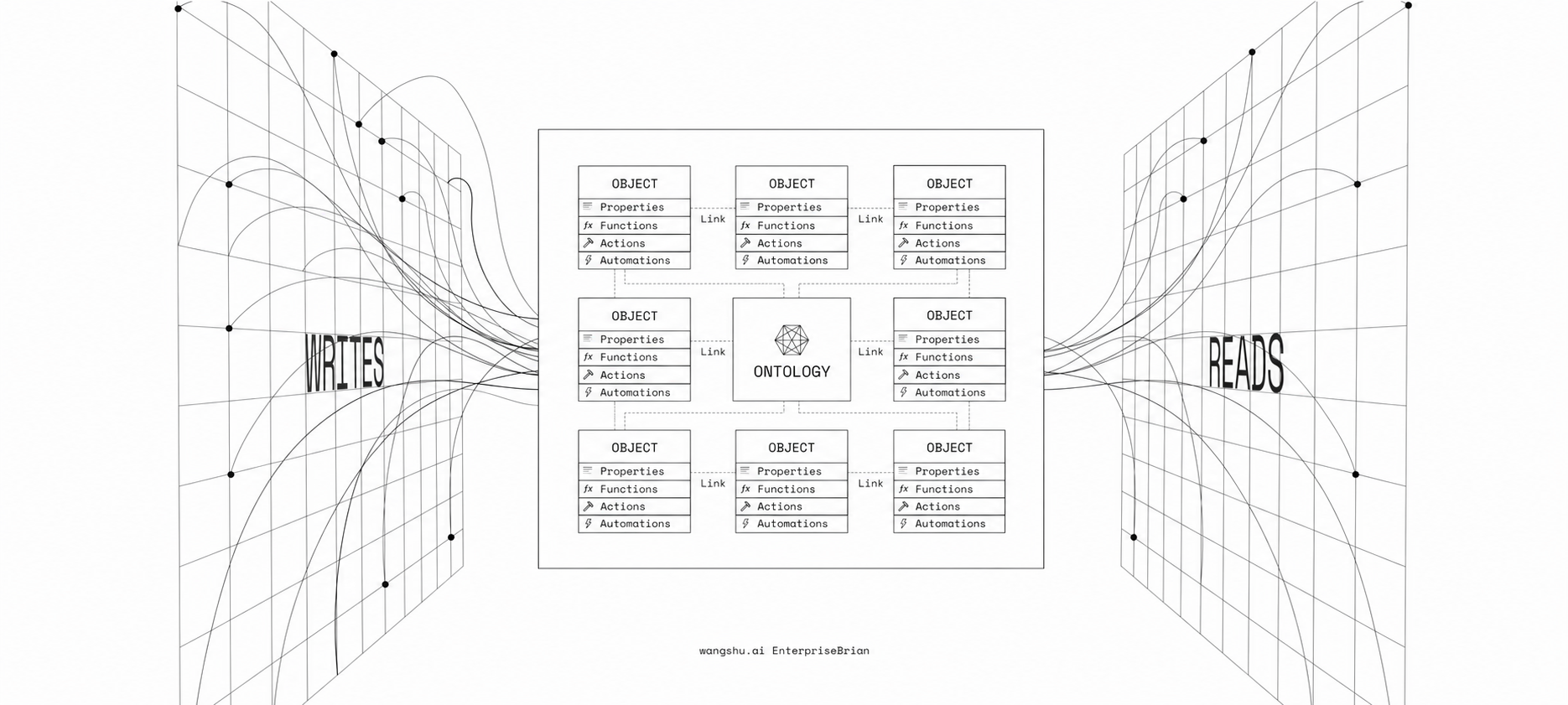
请选择一个数据源查看本体
点击节点查看详情
请先选择数据源
请先执行推理
AIP TALK
AIP TALK - 多源异构数据跨域检索 AI-Powered Automation for Every Decision
洞察问题
加载中...
洞察卡片
决策复盘
沉淀你的每次决策逻辑和判断
本体建议
系统自动提取的新术语、同义词和关系建议
洞察设置
配置洞察功能的自动生成、复盘时机和提取行为
启用洞察功能
开启后,系统将自动生成洞察问题和复盘报告
即时反问
每次对话结束后自动提出相关问题
定期复盘
按设定周期自动生成复盘报告
空闲触发
系统空闲时自动提出洞察问题
自动提取洞察
从查询结果中自动提取业务洞察
详细设置
租户管理
管理平台所有租户
| 租户ID | 名称 | 状态 | 套餐 | 创建时间 | 联系邮箱 | 操作 |
|---|
用户管理
管理租户内的用户
| 用户ID | 用户名 | 显示名 | 状态 | 租户 | 角色 | 操作 |
|---|
角色与权限
管理角色与权限配置
| 角色ID | 显示名 | 租户 | 类型 | 状态 | 操作 |
|---|
Skill 管理
管理平台 Skill 与启用配置
| Skill ID | 名称 | 分类 | 状态 | 作用域 | 操作 |
|---|
审计日志
查询、导出与清理审计日志
| 时间 | Action | 资源类型 | 资源ID | 用户 | 租户 | 结果 |
|---|
系统监控
实时查看系统资源与应用指标
资源使用率
应用统计
Top Actions
| Action | 次数 | 最近时间 |
|---|
配置管理
查看、快照与灰度发布系统配置
{}
{}
{}
第三方集成设置
管理 SSO 发行方与嵌入域名 allowed_origins
新增 SSO 发行方
HMAC 共享密钥,需与第三方系统的 ISSUER_SECRET 环境变量保持一致。
留空则不限制来源:任何 IP/域名只要 Secret 认证通过即可调用与嵌入。
同一实例经多个地址(localhost/局域网 IP/域名)访问时逐一列出;断言 aud 与 audience 或此处任一匹配即通过。
外部租户 ID(JWT 中的 tid)→ 本地 tenant_id 映射。留空时首次登录会自动创建 ID 为 ext:<issuer>:<tid> 的租户。
外部用户 ID(JWT 中的 sub)→ 本地 user_id 映射。命中后直接使用现有租户用户,不触发 JIT;若映射用户所属租户不符,会自动回退到 JIT 创建。
config.json 中添加 sso_trusted_issuers。
仅允许 http:// 或 https:// 完整域名,每行一个;不支持通配符或路径。留空表示不限制来源。
AIP TALK设置
AIP TALK 问答页的全局行为设置,对站内页面与第三方嵌入页面同时生效
个人资料
查看与管理你的个人信息
偏好设置
个人 Skill
查看当前生效的 Skill 配置
会话列表
查看你近期参与的会话
| 会话 ID | 时间 | 标题 |
|---|
操作记录
查看你近期的后台操作记录
| 时间 | Action | 资源类型 | 资源ID | 结果 |
|---|